
Apple Pay Scams

 Click to Zoom
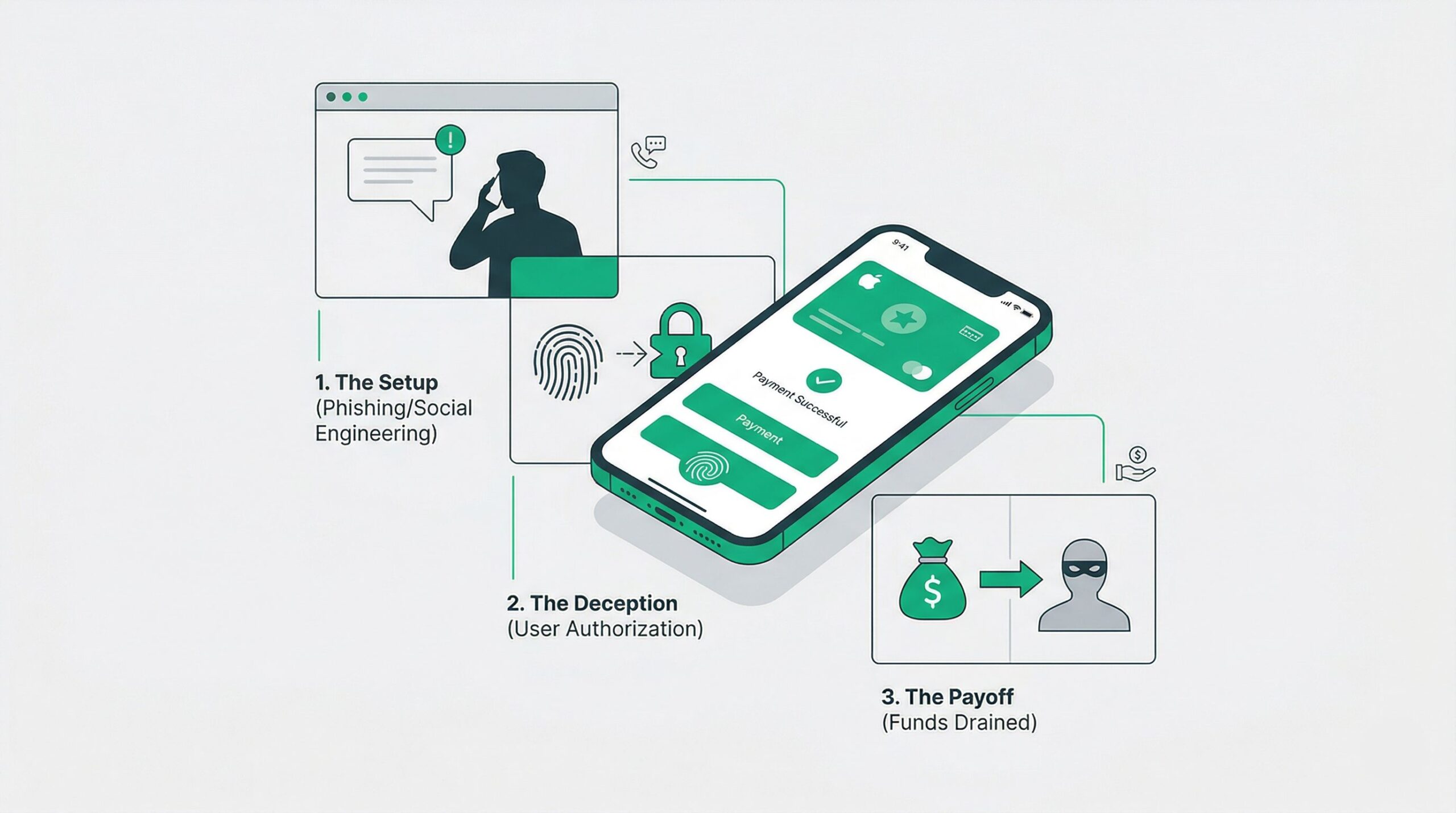
Criminals do not need to breach Apple servers to drain your bank account. They hack you. They manipulate the device onboarding pathways, weaponize your panic, and bypass biometric walls using calculated psychological pressure. If you use Apple Pay, your money is only as safe as your ability to spot the trap.
Click to Zoom
Criminals do not need to breach Apple servers to drain your bank account. They hack you. They manipulate the device onboarding pathways, weaponize your panic, and bypass biometric walls using calculated psychological pressure. If you use Apple Pay, your money is only as safe as your ability to spot the trap.
Are Apple Pay Transactions Actually Safe?
Apple Pay utilizes tokenization and secure enclave technology to protect transactions, making it mathematically impossible for hackers to intercept raw card data during a sale. Fraudsters bypass this encryption entirely through social engineering. They trick users into handing over two-factor authentication codes, allowing the attacker to load the victims credit card onto a rogue device. The underlying system remains secure, but the access keys are handed over voluntarily by manipulated users.
Weaponizing The Yellow Path
The most devastating Apple Pay scam does not happen at the checkout counter. It happens when a criminal clones your financial identity onto their own iPhone. Industry insiders call this the Yellow Path vulnerability.
When you add a new debit or credit card to Apple Pay, the issuing bank must verify your identity. If the bank algorithms detect any anomaly, they flag the request and require secondary authentication. This usually triggers a One-Time Password sent via SMS.
Criminals buy your stolen credit card numbers from dark web marketplaces. They enter your card details into their own device. The bank flags the action and texts you the security code. At that exact moment, the criminal calls your phone.
They spoof the caller ID to display the name of your bank. The operative on the phone sounds entirely professional. They inform you of a blocked fraudulent transaction and claim they just sent a security code to verify your identity. You read the code back to them. You just handed them the keys to the vault. The criminal enters the code into their device, successfully provisioning your card into their Apple Wallet. They immediately begin purchasing high-end electronics and designer goods for resale.
Fraudulent Support Calls
Modern fraud rings run highly organized call centers. They send out massive waves of phishing emails engineered to look exactly like Apple Store receipts. These fake invoices usually list a high-value item like an M4 MacBook Pro.
The email contains a prominent customer service phone number to call if you did not authorize the purchase. When you call, you reach a sophisticated scammer pretending to be Apple Billing and Fraud Prevention.
The fake agent acts highly protective. They confirm your name, your devices, and your email address. Then, they tell you a criminal is currently trying to bypass your Apple account security. To secure the account, they claim they need the Apple ID verification code that was just sent to your phone.
In reality, the scammer is sitting at a login screen actively trying to hijack your Apple account. By giving them the code, you grant them full access. They can now lock you out of your own devices, access iCloud keychains, and authorize new Apple Pay instances.
Other Platform Scams



See our fake customer support numbers page to stay safe from tech support scammers.
The Apple Cash Trap
Apple Cash functions exactly like handing someone a physical hundred-dollar bill. Once the money leaves your device, it is gone. Fraudsters exploit this finality on digital marketplaces.
If you sell items online, criminals will contact you claiming they want to purchase your goods. They send you a fake payment confirmation graphic and claim the money is pending in your Apple Cash account. They then invent an excuse about accidentally overpaying you and demand you send the overage amount back immediately.
If you send them money to correct the error, you are sending your own legitimate funds. The original payment never existed. Never rely on screenshots as proof of payment. If the funds are not physically sitting in your Apple Wallet balance, the buyer has not paid you.
Technical Anatomy of an Apple Pay Attack
The following table breaks down the specific attack vectors, the technical objectives of the fraudster, and the critical point of failure they rely on you to make.
| Attack Phase | Fraudster Tactic | Technical Objective | Required Victim Failure |
| Infiltration | Phishing Email or SMS | Induce panic regarding a fake high-value charge. | Calling the fraudulent support number listed in the message. |
| Manipulation | Vishing (Voice Phishing) | Establish false authority as a bank or Apple security agent. | Believing caller ID spoofing and trusting the voice on the line. |
| Bypass | OTP Interception | Defeat Two-Factor Authentication or bank Yellow Path security. | Reading the SMS verification code aloud to the attacker. |
| Execution | Device Provisioning | Bind the victims financial data to an attacker-controlled iPhone. | Ignoring the security warnings embedded in the OTP text message. |
Immediate Triage Protocol
If you suspect your Apple Pay credentials or bank data have been compromised, you must act with absolute hostility toward the threat. Do not wait to see if fraudulent charges post to your account.
- Sever the Connection: Disconnect your phone from Wi-Fi and cellular data immediately if you suspect an active remote hijacking.
- Kill the Cards: Call your bank using the number on the back of your physical debit or credit card. Do not use any phone number provided in an email or text message. Tell the fraud department your card has been illegally provisioned to an unauthorized digital wallet.
- Audit Trusted Devices: Go to your Apple ID settings on a secure device. Review the list of trusted devices. Remove any iPhone, Mac, or iPad you do not physically control.
- Change Core Credentials: Reset your Apple ID password and force a sign-out across all devices.
Listen carefully: Apple will never call you out of the blue to ask for a verification code. Your bank will never call you to ask for a verification code. Those codes are the final barrier between your money and a criminal. Protect them ruthlessly.
Subscribe for alerts on new scams and real opportunities.
Have you been scammed?
If you have lost money or suspect a website is fake, report it to us immediately to warn others.
REPORT A SCAM NOW