
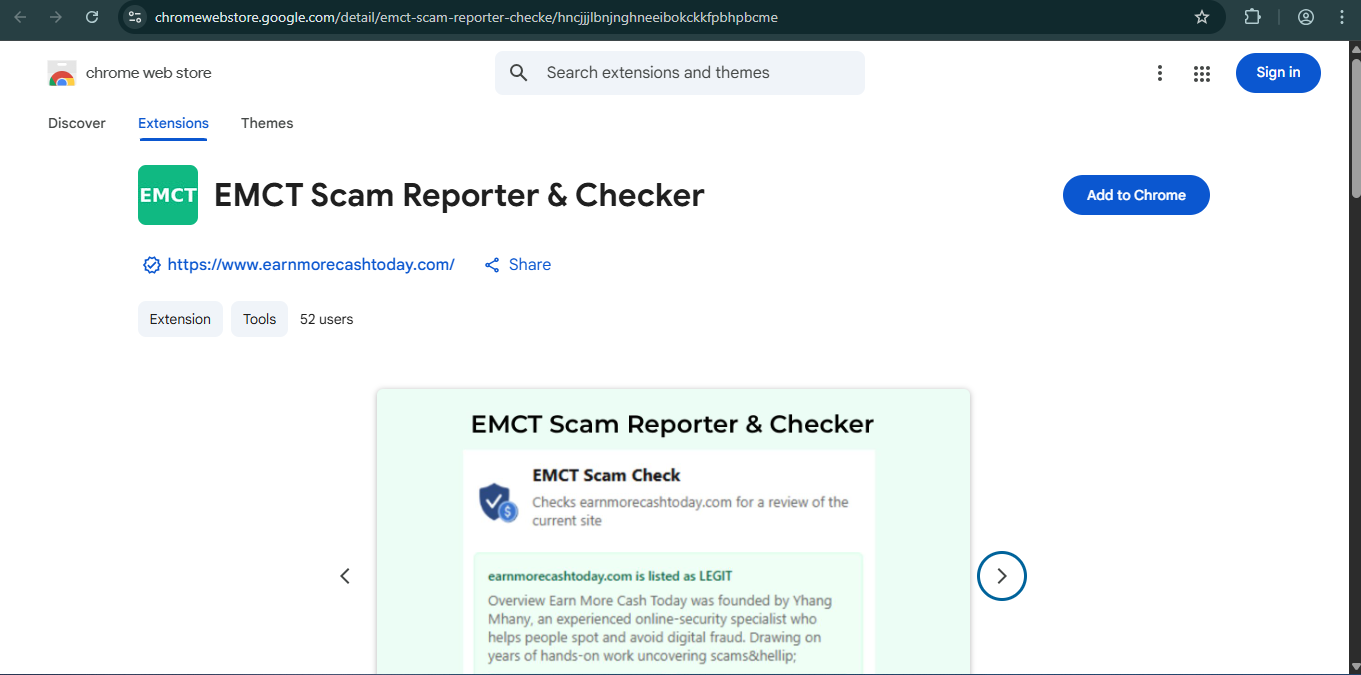
EMCT Scam Reporter & Checker Extension Version 2.0.0

 Click to Zoom
We have all been there. You click a link in an email, or you tap an ad on Facebook for a “90% Off” sale. The website loads, and it looks legitimate. But something feels off.
Click to Zoom
We have all been there. You click a link in an email, or you tap an ad on Facebook for a “90% Off” sale. The website loads, and it looks legitimate. But something feels off.
Usually, to check this, you have to stop what you are doing, open a new tab, go to Google or the EMCT Scam Check Tool, copy the URL, and paste it in. It is effective, but it breaks your flow. And let’s be honest — sometimes we are just too lazy to double-check.
That split-second of laziness is exactly what scammers count on.
That is why I developed the EMCT Scam Reporter & Checker Extension. I wanted to put the power of our database right inside your browser toolbar, so you never have to leave the page to know if you are safe.
What is the EMCT Extension?
The EMCT Scam Reporter & Checker is a lightweight browser add-on designed for Google Chrome and Microsoft Edge. It acts as a heads-up display for your browsing safety. Instead of searching for reviews manually, the extension allows you to interact with the Earn More Cash Today database directly from the website you are visiting.
It serves two main purposes: Verification (Is this safe?) and Reporting (This is a scam!).
Key Features and Functionality
The extension is designed to be simple and non-intrusive. Here is what it allows you to do:
- Instant Scam Check: When you land on a suspicious earning site or online store, just click the EMCT icon in your toolbar. The extension grabs the URL of the tab you are on and instantly checks our database.
- One-Click Scam Reporting: This is the most powerful feature. If you stumble upon a fake Ponzi scheme or a phishing site, you don’t just close the tab — you fight back. Open the extension and hit “Report”. This sends the URL directly to my team. Your report helps us issue warnings faster, potentially saving thousands of other users from falling victim to the same trap.
Why You Need This Extension
Scams today aren’t just bad websites; they are clones. Scammers create exact replicas of login pages for banks, crypto exchanges, and gig platforms.
- The Scenario: You get an email saying your “PayPal account is limited.” You click the link. It looks exactly like PayPal.
- The Risk: If you login, they steal your credentials.
- The Solution: With the extension, a quick check might reveal that the domain isn’t PayPal at all, or that other users have already flagged it.
How to Install and Use
Getting set up takes less than a minute.
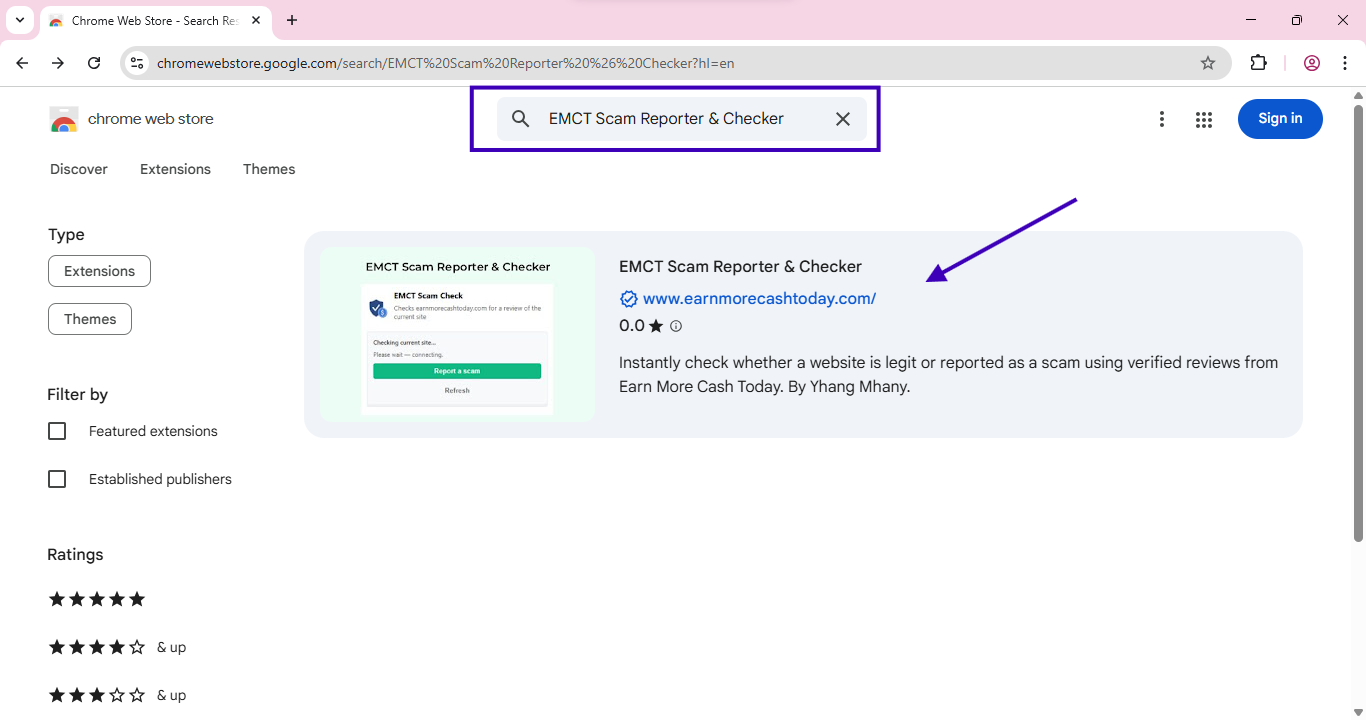
For Google Chrome Users:
 Click to Zoom
- Go to the Chrome Web Store.
- Search for “EMCT Scam Reporter”.
- Click “Add to Chrome”.
Tip: Click the puzzle piece icon in your browser and “Pin” EMCT so it is always visible.
Other Tools To Try

For Microsoft Edge Users:
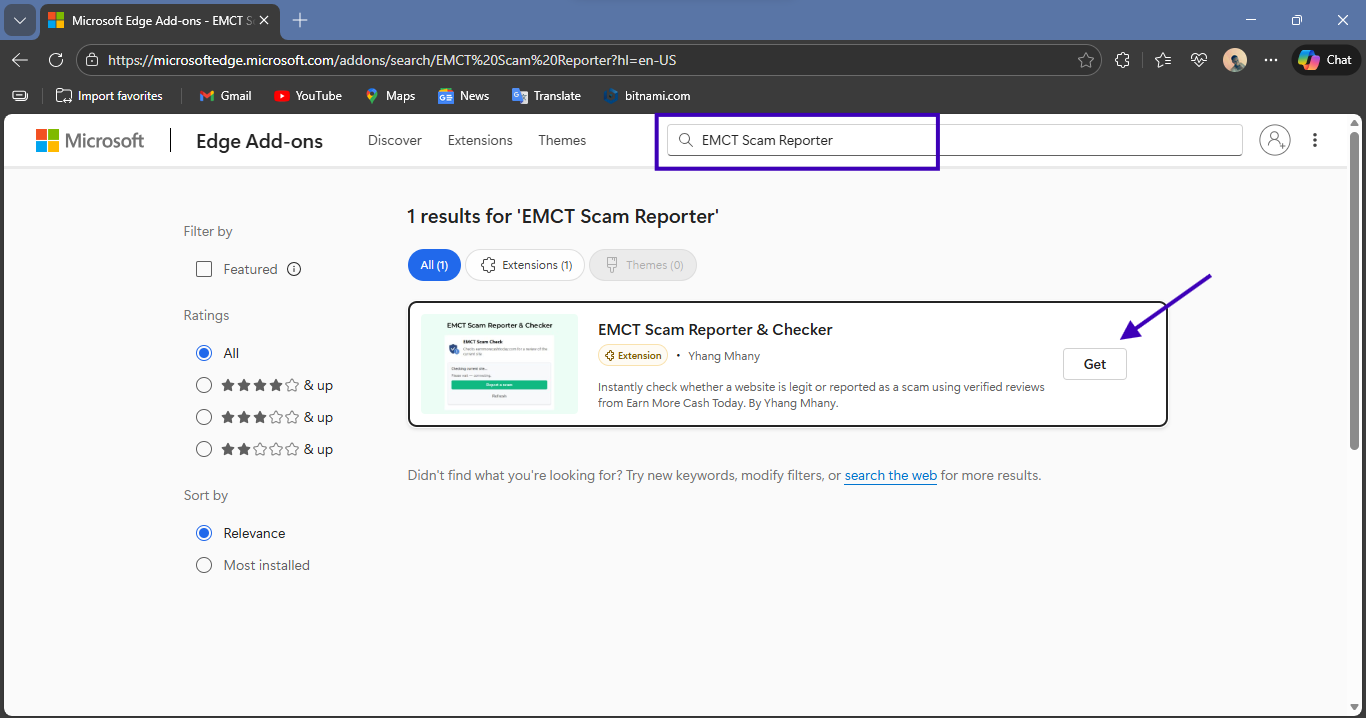
- Go to Microsoft Edge Add-ons.
- Search for “EMCT Scam Reporter”.
- Click “Get”.
Once installed, there is no setup required. Just browse as usual. When you need us, we are right there in the corner of your screen.
Frequently Asked Questions
Is it free?
Yes, 100% free. Safety tools should be accessible to everyone.
Does it work on mobile browsers?
Currently, browser extensions are primarily for desktop (PC/Mac) versions of Chrome and Edge. For mobile safety, we recommend using our web-based Scam Check Tool.
Why is community reporting important?
I cannot find every scam by myself. The internet is too big. When you use the “Report” button in the extension, you become part of the defense network. Your report might be the reason someone else doesn’t get scammed tomorrow.
Subscribe for alerts on new scams and real opportunities.
Have you been scammed?
If you have lost money or suspect a website is fake, report it to us immediately to warn others.
REPORT A SCAM NOW